Electrical Products & Services
How UPS units regulate voltage, filter noise, limit spikes and provide battery backup; pick the right type and size for your load.
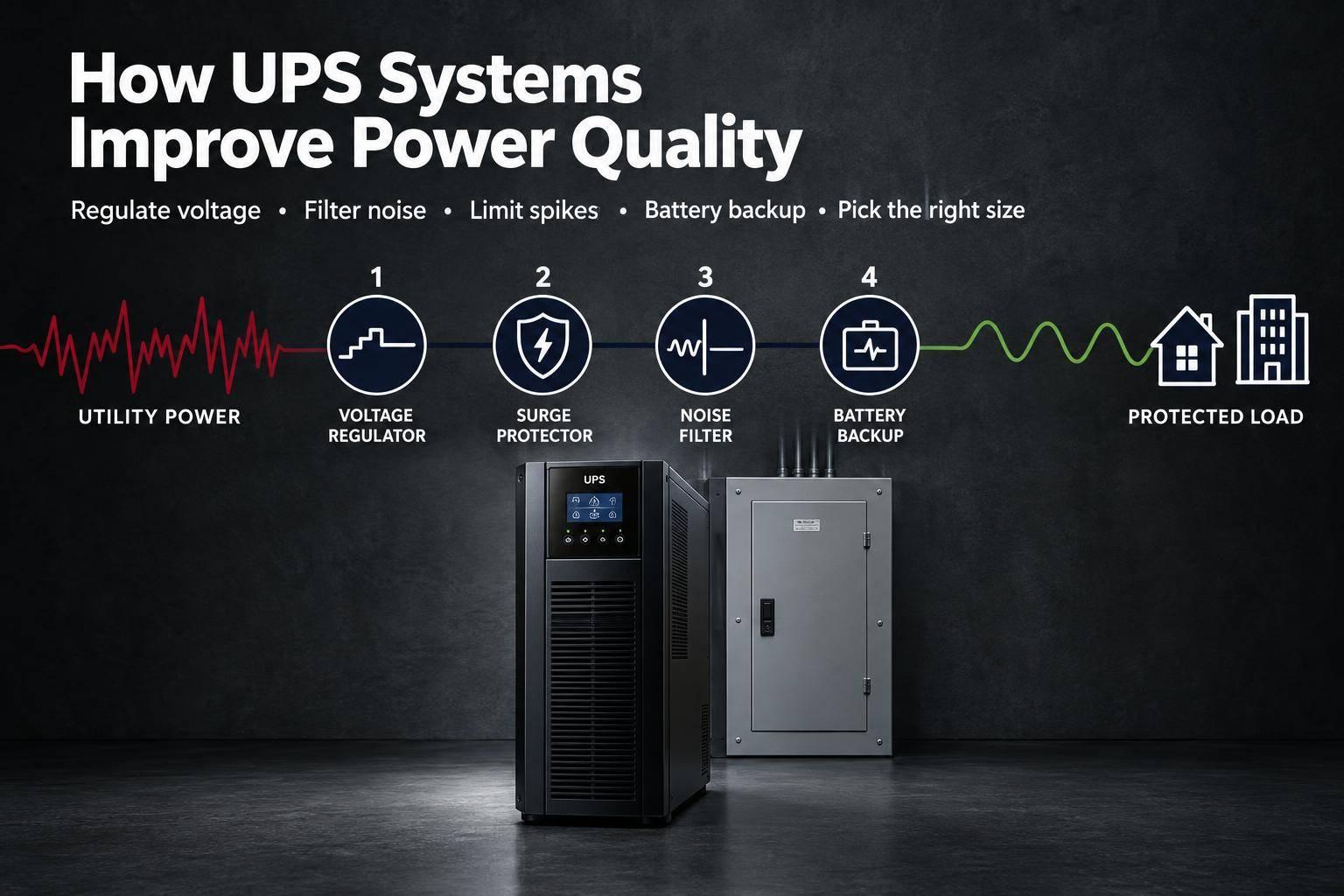
A UPS can steady voltage, filter electrical noise and keep equipment running briefly during an outage – but protection depends on the design. I’d start by checking your equipment’s watt and VA demand: a 1,000 VA UPS does not necessarily supply 1,000 W.
Here’s how I’d narrow down the options:
Then I’d check surge ratings, equipment compatibility and runtime at your actual load. Plan automatic shutdown, allow for battery ageing, and confirm generator compatibility if you have backup power.
<u>A UPS cannot fix faulty wiring or poor grounding.</u> In Ontario, use a Licensed Electrical Contractor for hardwiring or circuit changes, and follow the manufacturer’s placement, testing and battery-care instructions.
UPS design differences affect how each unit regulates voltage and switches to battery power.
Automatic voltage regulation (AVR) uses transformer taps or similar circuitry to correct low or high voltage within the UPS’s operating range. This reduces stress on equipment without draining the battery. Check the manufacturer’s correction range: AVR cannot cover a prolonged outage or correct voltage outside the unit’s rated limits.
When input power fails or falls outside acceptable limits, the battery-powered inverter temporarily supplies AC power. Standby and line-interactive units may have a brief transfer delay, so check that your equipment can tolerate it. Runtime depends on connected wattage, battery condition and temperature. Set up automatic shutdown before the battery runs out.
A UPS can also limit brief voltage spikes and reduce electrical noise.
Surge suppression limits short voltage spikes within the unit’s tested rating. Noise filtering reduces conducted high-frequency interference that can disrupt electronics.
Neither feature guarantees protection against every surge or lightning event. Neither corrects sustained overvoltage or utility faults. Treat them as point-of-use protection, not a replacement for proper wiring and grounding.
An online double-conversion UPS converts incoming AC to DC, then uses an inverter to recreate clean AC. Since the inverter already supplies the connected equipment, switching to battery power usually causes no interruption.
Voltage, frequency and waveform control depend on the model and operating mode. Total harmonic distortion (THD) measures harmonic content relative to the fundamental waveform. Read output-voltage THD ratings alongside the stated load conditions. The UPS conditions power only for the connected load – not the building’s entire electrical system.
Bypass mode routes power around the inverter during overloads, faults or maintenance. Economy mode normally uses utility power and switches to the inverter only when needed. Check the bypass voltage and frequency limits, transfer time and overload ratings.
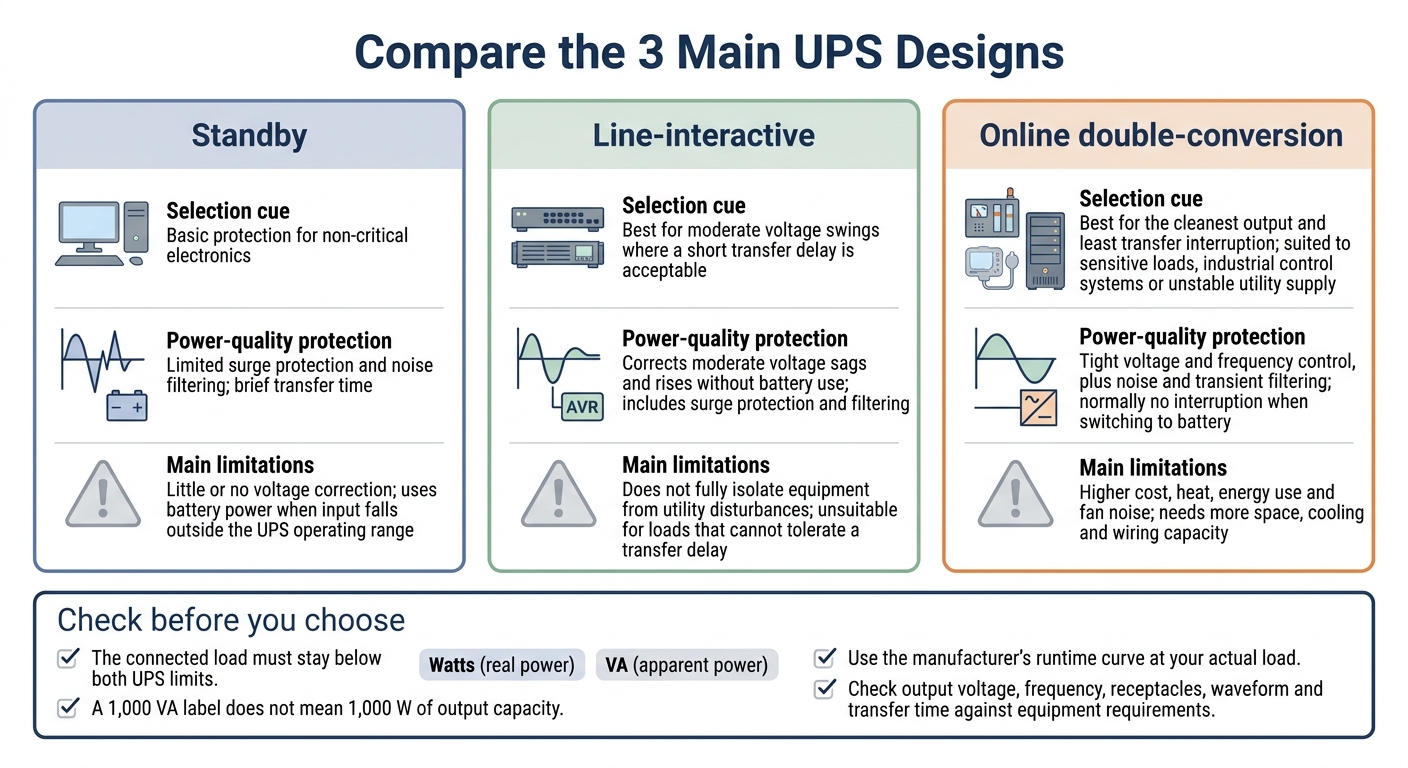
Compare the 3 Main UPS Designs
Match the UPS design to the power conditioning your equipment needs. Check whether devices can tolerate a brief transfer delay, how often voltage drops or climbs, and how much heat and fan noise the space can handle.
| UPS design | Selection cue | Power-quality protection | Main limitations |
|---|---|---|---|
| Standby | Basic protection for non-critical electronics | Limited surge protection and noise filtering; brief transfer time | Little or no voltage correction; uses battery power when input falls outside the UPS operating range |
| Line-interactive | Best for moderate voltage swings where a short transfer delay is acceptable | Corrects moderate voltage sags and rises without battery use; includes surge protection and filtering | Does not fully isolate equipment from utility disturbances; unsuitable for loads that cannot tolerate a transfer delay |
| Online double-conversion | Best for the cleanest output and least transfer interruption; suited to sensitive loads, industrial control systems or unstable utility supply | Tight voltage and frequency control, plus noise and transient filtering; normally no interruption when switching to battery | Higher cost, heat, energy use and fan noise; needs more space, cooling and wiring capacity |
Once you’ve chosen a design, size the UPS for the actual load. Identify which devices need battery backup, record their nameplate ratings and measure operating demand where possible. Power-quality protection depends on both the UPS design and the equipment connected to it.
Account for startup current and planned additions. Keep printers, heaters and non-critical displays off the protected load unless the UPS specifically supports them.
Watts measure real power; VA measures apparent power. The connected load must stay below both UPS limits.
A 1,000 VA label does not mean 1,000 W of output capacity.
Leave spare capacity rather than sizing the UPS to its maximum rating. Check output voltage, frequency, receptacles, waveform and transfer time against equipment requirements, including those for active power-factor-corrected supplies. Never assume a desktop UPS supports motors, pumps, heating appliances or medical equipment.
With the load set, decide how long the UPS needs to support it and which equipment should shut down first. Use the manufacturer’s runtime curve at your actual load, not an advertised runtime or VA rating. Set the goal: brief ride-through, generator startup or orderly shutdown. Allow reserve runtime for battery ageing and load changes, and add external batteries only if the UPS supports them.
Document priority loads, notification contacts, shutdown thresholds and the shutdown sequence. For unattended computers and storage, confirm that compatible USB, serial or network monitoring ports and automatic shutdown software are available.
If the UPS will work with generator backup, include charging load and transfer timing in the runtime plan. Check generator start time, voltage and frequency compatibility, and capacity to power both the equipment and UPS battery charging. These factors affect battery charging and shutdown timing. In Ontario, a qualified electrical contractor must install generator and transfer-switch equipment to applicable electrical requirements.
Once you’ve sized the UPS, install and maintain it so it can provide the voltage control and battery support described above without compromising surge suppression. A plug-in UPS can connect to a suitable grounded receptacle. Hardwiring and circuit changes require a Licensed Electrical Contractor. Electrical work must meet the Ontario Electrical Safety Code and applicable Electrical Safety Authority (ESA) requirements.
Follow the manual’s ventilation clearances and operating temperature limits in °C. Place the UPS indoors on a stable, dry surface, away from moisture, dust, direct sunlight, radiators and furnaces. Keep air vents clear, and leave controls, plugs and any required disconnect accessible.
Check that the circuit can handle the UPS input demand and that the UPS rating matches the connected load’s wattage and VA. Don’t use extension cords, power bars or daisy-chained UPS units unless the manufacturer expressly permits them.
Heat, buzzing, burning smells or repeated breaker trips call for an inspection. Have a Licensed Electrical Contractor inspect wiring, grounding and circuit issues.
Record the model, battery installation date, protected loads and expected runtime. Check indicators, alarms, vents, cables and event logs monthly, or at the interval the manufacturer recommends.
Repeated alarms, battery transfers or overloads may point to unstable input power or load problems. Record event dates and times, then compare them with breaker trips and equipment faults.
A self-test does not confirm full runtime. Schedule any runtime assessment during an approved maintenance window. Qualified personnel should manage bypass transfers or load transfers to avoid unexpected interruptions to critical equipment.
Recheck the load and runtime after adding devices. Use only the approved replacement battery type, and follow the model-specific replacement and ventilation instructions. Leave internal servicing to qualified personnel: batteries can deliver dangerous fault current even without utility power.
Take spent batteries to an approved battery or e-waste collection program – not household garbage. Use the logs to spot recurring transfers, overloads or temperature warnings before they affect uptime.
For generator-backed systems, installation must match the runtime and transfer plan already set. Have the installer verify voltage, frequency, waveform and load compatibility. That check must include starting and inrush loads, battery charging demand and the UPS manufacturer’s acceptable input range.
Transfer equipment must prevent backfeed to utility lines. Grounding, bonding and neutral switching also need review.
UPS systems improve power quality in different ways, depending on the equipment and the disturbance. AVR corrects moderate voltage swings, surge suppression limits spikes, filtering reduces noise, and batteries cover outages. Online double-conversion UPS systems provide the tightest voltage and frequency control.
Choose a UPS based on your equipment’s sensitivity, watt and VA load, startup demand, and runtime needed for safe shutdown or to bridge the gap until a generator takes over – not just battery size.
Document critical loads, your runtime target, and the shutdown order. For electrical troubleshooting or installation in the Ottawa Valley, contact Draper Electric. Use the UPS as one layer of protection, alongside proper wiring, grounding, and connected backup power.
Watch for flickering or dimming lights, buzzing sounds, warm outlets, scorch marks or discolouration around outlets and switches, burning smells, or circuit breakers that trip often. These warning signs may point to voltage inconsistencies, melting wire insulation, surges or overloads.
If you notice any of these signs, Draper Electric offers professional troubleshooting and maintenance to help keep your home’s electrical system safe and efficient.
Yes, you may still need an uninterruptible power supply (UPS). Whole-home surge protection guards against damaging voltage spikes, but it doesn’t supply backup power or correct sustained voltage problems or minor fluctuations.
A UPS supplies emergency power to keep sensitive electronics running during an outage or give you time to shut them down safely. For the best protection, experts recommend pairing whole-home surge protection with point-of-use devices.
Replace the entire uninterruptible power supply (UPS), not just its battery, if it shows signs of internal failure. These signs include damaged electrical components or warning indicators that remain after troubleshooting. Batteries need periodic replacement, but the UPS’s circuitry also wears down over time.
If the unit no longer stabilizes voltage properly or signals that its protective functions aren’t working as intended, consult a licensed electrician to determine whether the whole system needs replacing.