Electrical Products & Services
Chemistry, depth-of-discharge, charge rates and temperature affect battery storage life—monitor capacity and replace based on backup runtime.
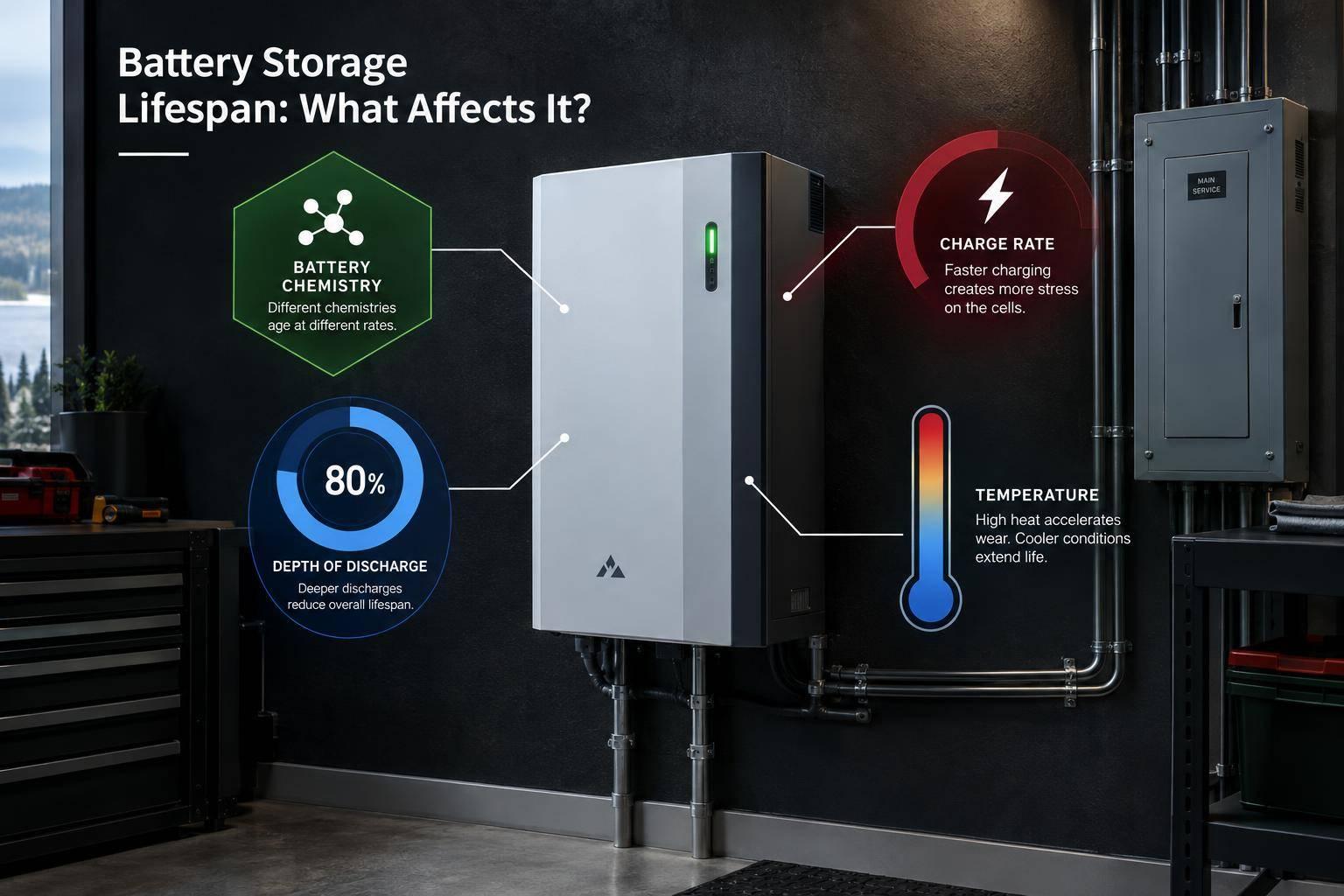
I judge battery lifespan by the backup time it still provides – not warranty years alone. To reduce wear, follow the manufacturer’s charge settings and temperature limits in °C, and track changes in capacity and runtime.
Here’s what I check:
My replacement rule is simple: <u>check whether the battery still meets your backup needs</u>. A lower capacity reading isn’t, by itself, proof of battery failure.
Batteries age in two ways: calendar ageing is wear over time, while cycle ageing comes from charging and discharging. State of charge tells you how full a battery is. Depth of discharge (DoD) tells you how much has been used. Usable capacity is the energy the system can deliver within its limits.
Equivalent full cycles add partial discharges together and count them as full cycles. That helps track use, but wear still depends on discharge depth, temperature and charge rate.
| Rating | What it measures | What to check before comparing |
|---|---|---|
| Cycle life | Cycles before a stated capacity threshold | DoD, temperature, charge rate and cycle definition |
| Calendar life | Time before a stated ageing threshold | Storage temperature and state of charge |
| Warranty period | Duration of coverage | Start date, exclusions and throughput limits |
| Usable capacity | Energy available within operating limits | Battery-side or AC output measurement |
| End-of-life threshold | Remaining capacity at the test endpoint | Percentage of original capacity and measurement method |
A capacity threshold marks a test endpoint – not battery failure. Ratings, studies and warranties do not set a replacement date.
Ageing ratings also depend on battery chemistry and the system’s built-in controls. Chemistry affects how fast cycle and calendar ageing build up, but test data for the specific model matters more.
Lithium iron phosphate (LFP) is a lithium-ion chemistry, not a separate battery class. When comparing its documentation with nickel manganese cobalt (NMC) and lead-acid battery documentation, check the following lifespan factors.
| Chemistry | Cycle durability | Temperature limits | Efficiency | Safety controls |
|---|---|---|---|---|
| LFP | Tested cycles, DoD and capacity endpoint | Charging, discharging and storage limits | Documented system efficiency | Compatible battery management system (BMS) and electrical protection |
| NMC | Tested cycles, DoD and capacity endpoint | Charging, discharging and storage limits | System figures, not cell figures | Compatible BMS and required protective controls |
| Lead-acid | Specific design’s cycle data | Temperature-related charging limits | System efficiency and test conditions | Ventilation, charging control and electrical protection |
A compatible BMS can balance cells, monitor temperature, restrict charging and trigger protective shutdowns. These controls reduce exposure to damaging conditions, but they do not stop ageing. Lead-acid batteries still need ventilation, charging control and electrical protection.
Warranties usually limit coverage by time or throughput. They do not state how long the battery will actually operate.
A rated lifespan is useful only when you compare it with expected daily throughput.
Hypothetical usage calculation – not a lifespan prediction: Discharging 8 kWh daily for 365 days produces approximately 2,920 kWh of discharge throughput. Converting that into equivalent full cycles requires the applicable capacity basis. More daily cycling uses a cycle allowance faster, but throughput alone does not predict when the battery will need replacement.
Check whether the warranty counts discharged energy, charged energy or another throughput measure. Compare the rated conditions with your intended use, then confirm operating limits, coverage duration and installation requirements.
Cycle life and warranty limits measure different things. Use expected annual throughput to plan capacity checks and replacement. Heavier use can mean those decisions come sooner.
Battery life estimates apply only when the battery operates within its design range. Discharge depth, temperature, and load affect how soon it reaches end-of-life.
Follow the system’s documented reserve and charging limits. Charge settings aren’t interchangeable across battery chemistries.
| Operating choice | Daily cycling | Standby backup |
|---|---|---|
| Cycling exposure | Frequent charging and discharging adds wear | Fewer cycles, but outages may require deeper discharge |
| Calendar ageing | Time spent at high charge adds ageing stress | Batteries still age while sitting at higher temperatures or states of charge |
| Reserve needs | Energy used for savings is unavailable during an unexpected outage | Keeping more energy in reserve supports outage readiness |
| Settings | Balance scheduled discharge with the required backup reserve | Follow the manufacturer’s standby settings and charging guidance |
Temperature also limits battery life, especially in Ottawa Valley installations.
Heat speeds up chemical ageing. Winter cold can temporarily reduce available energy and power. Charging outside the manufacturer’s temperature limits can damage the battery. Charging, discharging, and storage may each have different temperature limits.
When choosing an installation location, leave enough space near the electrical panel for the battery and related equipment. Keep the system gateway connected to the internet for monitoring and updates.
Power demand can also shorten battery life when loads exceed the system’s rated output.
Charge rate describes how fast energy enters the battery; discharge rate describes how fast it leaves. Running appliances together or starting motors increases demand. Check both continuous and surge limits: enough stored energy doesn’t guarantee enough power to start every load.
Use compatible chargers, and have the installer confirm inverter settings and approved rate limits. Consumption monitoring can help spot overlapping loads that you can schedule separately.
Cold or heat can temporarily reduce output. Re-test under the manufacturer’s specified conditions before treating reduced output as a sign of ageing.
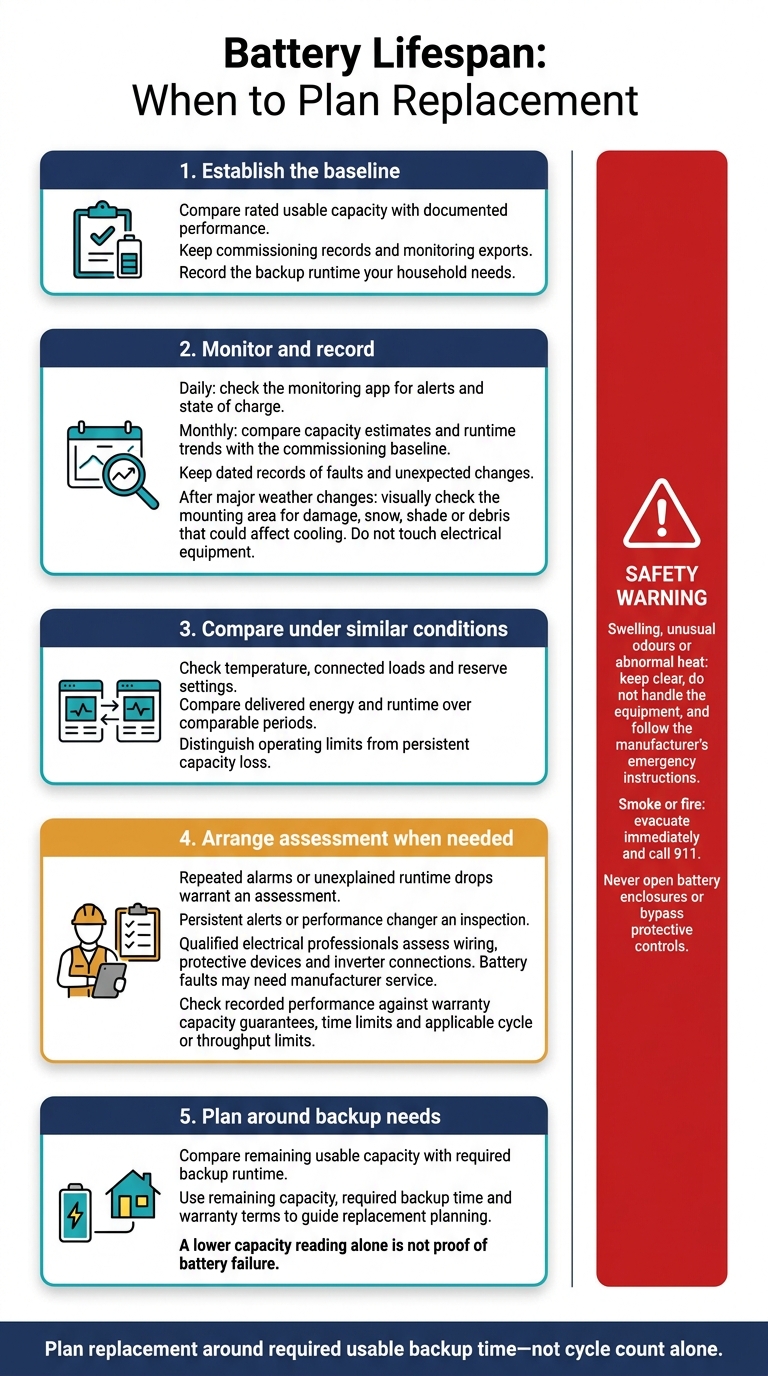
Battery Lifespan: When to Plan Replacement
Routine checks help you spot when normal wear becomes measurable capacity loss.
Check the monitoring app daily for alerts and state of charge. Each month, compare capacity estimates and runtime trends with the commissioning baseline. Keep dated records of faults and unexpected changes. After major weather changes, check the mounting area for damage, snow, shade or debris that could affect cooling. Don’t touch electrical equipment during these checks.
Follow the manufacturer’s schedule for inspections, firmware updates and servicing. Confirm the manufacturer’s guidance before changing operating modes or backup reserves. Never open battery enclosures or bypass protective controls. Leave wiring, electrical testing and system expansion to qualified professionals. If alerts or performance changes persist, arrange an inspection.
Treat abnormal monitoring results as reasons for an inspection – not normal variation. Schedule an assessment if alarms repeat or runtime drops without explanation.
Swelling, unusual odours or abnormal heat need urgent attention. Keep clear, don’t handle the equipment and follow the manufacturer’s emergency instructions.
If you see smoke or fire, evacuate immediately and call 911.
A qualified electrical professional should assess wiring, protective devices and inverter connections. Battery faults may need manufacturer service. In the Ottawa Valley, Draper Electric handles electrical maintenance, troubleshooting, generator and transfer-switch work.
Compare performance in your service records with the battery’s rated baseline. This helps separate operating limits from actual battery degradation.
| Check | Comparison point | Why it matters |
|---|---|---|
| Rated capacity | Rated usable capacity vs. documented performance | Sets the baseline |
| Operating conditions | Temperature, connected loads and reserve settings | Helps separate operating limits from capacity loss |
| Monitoring data | Delivered energy and runtime over comparable periods | Shows whether a decline persists |
| Warranty coverage | Recorded performance against capacity guarantees, time limits and applicable cycle or throughput limits | Helps identify a possible claim |
| Replacement needs | Remaining usable capacity vs. required backup runtime | Identifies the replacement threshold |
Use these records to check whether shorter runtime points to battery failure or operating conditions. Base replacement planning on the backup time you need, the battery’s remaining usable capacity and the warranty terms. Keep commissioning records and monitoring exports to support warranty claims.
Battery chemistry sets what a battery can do – not when it needs replacing. How long it stays useful depends on cycling, charge level, charge and discharge rates, and temperature.
To reduce wear, use manufacturer-approved depth-of-discharge and charge-rate settings. Check performance regularly and have a qualified professional inspect the electrical system. In the Ottawa Valley, choose a battery location that limits exposure to winter cold, snow, and summer heat.
Plan replacement around required usable backup time, not cycle count. The test is whether the system still meets your backup target. Reassess capacity when household demand changes, especially after adding an EV.
Use your battery storage system’s smart monitoring app to track battery health, charge level and usable capacity over time [1]. As the battery ages and loses capacity, compare its remaining capacity with your daily energy use in kilowatt-hours (kWh). This helps you estimate whether it can still power your must-have devices and appliances [1]. Set a minimum charge threshold in the app to help manage your backup reserves [1].
Yes. For Ottawa Valley winters, adjust your battery settings and control the temperature around your equipment to protect performance and battery life.
Before temperatures drop below −10 °C, check that battery warmers or block heaters work. For off-grid setups, consider built-in heating for sub-zero conditions. Keep equipment at a steady temperature to prevent freezing.
Draper Electric can provide winter maintenance to help fine-tune your system and get your backup power ready.
Start by calculating your daily energy use and identifying must-have circuits for heating, cooling, refrigerators, and medical devices. For a typical household, plan for approximately 30 kWh per day, adjusted to match your appliance load.
Many modern systems let you set a minimum battery charge to keep power in reserve for outages. Give priority to must-have circuits and use smart monitoring features to track and manage consumption.